
Ivan Matiushkin · Practical migration guides
How to verify that a data migration succeeded
An import job finishing without a crash is only one signal. Acceptance requires evidence that the intended records reached the target with the expected values, and that every difference has been explained.
Independent technical walkthrough using synthetic data. Not a client deployment.
1. Define the comparison before the run
Agree which records belong in scope and how their identifiers match between systems. Compare relevant fields as well as record counts. Equal totals alone can hide offsetting errors; equal counts can hide one missing and one unexpected record.
2. Read the failed result
The synthetic source contains six records with a gross control total of PLN 1,534.50. With the SKU-X99 mapping removed, only four reach the target, whose gross total is PLN 250.00. Reconciliation returns FAIL. The missing target records are TX-104 and TX-106.
3. Correct configuration without rewriting good records
Restore the missing mapping. This changes the configuration but does not itself deliver the two missing records. The previous four target records remain in place. A corrected setting is not yet evidence of a successful migration.
4. Replay only failed records
The failed-only replay selects TX-104 and TX-106, skips TX-101, TX-102, TX-103 and TX-105, and records two new writes. Inspect the attempt history to confirm what was selected and skipped. Then explicitly run reconciliation again.
5. Inspect the accepted evidence
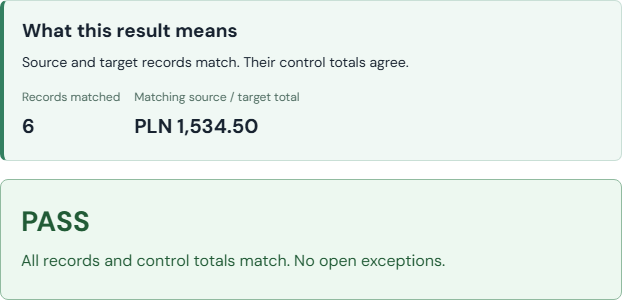
The final result is six source records and six target records, with PLN 1,534.50 on each side and all six comparisons matching. Download HTML for review or JSON for machine-readable evidence. Keep the run identifier, input hash, mapping, attempts and per-record comparisons together.
6. Interpret PASS within its scope
Here PASS means source and target match under the implemented migration checks. It does not prove every business rule or production requirement. The separate Revenue BI example uses different acceptance rules: explicitly excluded source defects can coexist with reconciliation PASS. Read the definition for the workflow being accepted.
See a sample acceptance report →
 Open working example